Earlier, I emailed the support who directed me here. I bought this product as mentioned in the subject here is my issue (copy/pasted from the email):
‘1. Update Smart Lock Firmware’ - My smart lock firmware is 5.7.9 which I believe is the latest.
‘2. Connect Smart Lock to Network’ - Wifi is enabled in the lock and I can see that it is getting an IP address
‘3. Check Protocol Versions:’ - My MQTT server supports 3.1.1 and v5; I dont think protocol is an issue
'4. Verify Client Identifier:
Ensure that the client identifier is unique and clearly assigned to each connected client.
Contact the Support Team if the app indicates an incorrect identifier causing MQTT connection issues.
’ - Well the lock doesnt even reach this far. Here is what I did.
I sat near the lock with a laptop and my phone with the Nuki app connected to the lock through bluetooth - all connected to the same wifi.
1a - Lock Wifi enabled and I see the IP address of the lock in the Nuki app
Tailing the logs of the MQTT server from my laptop
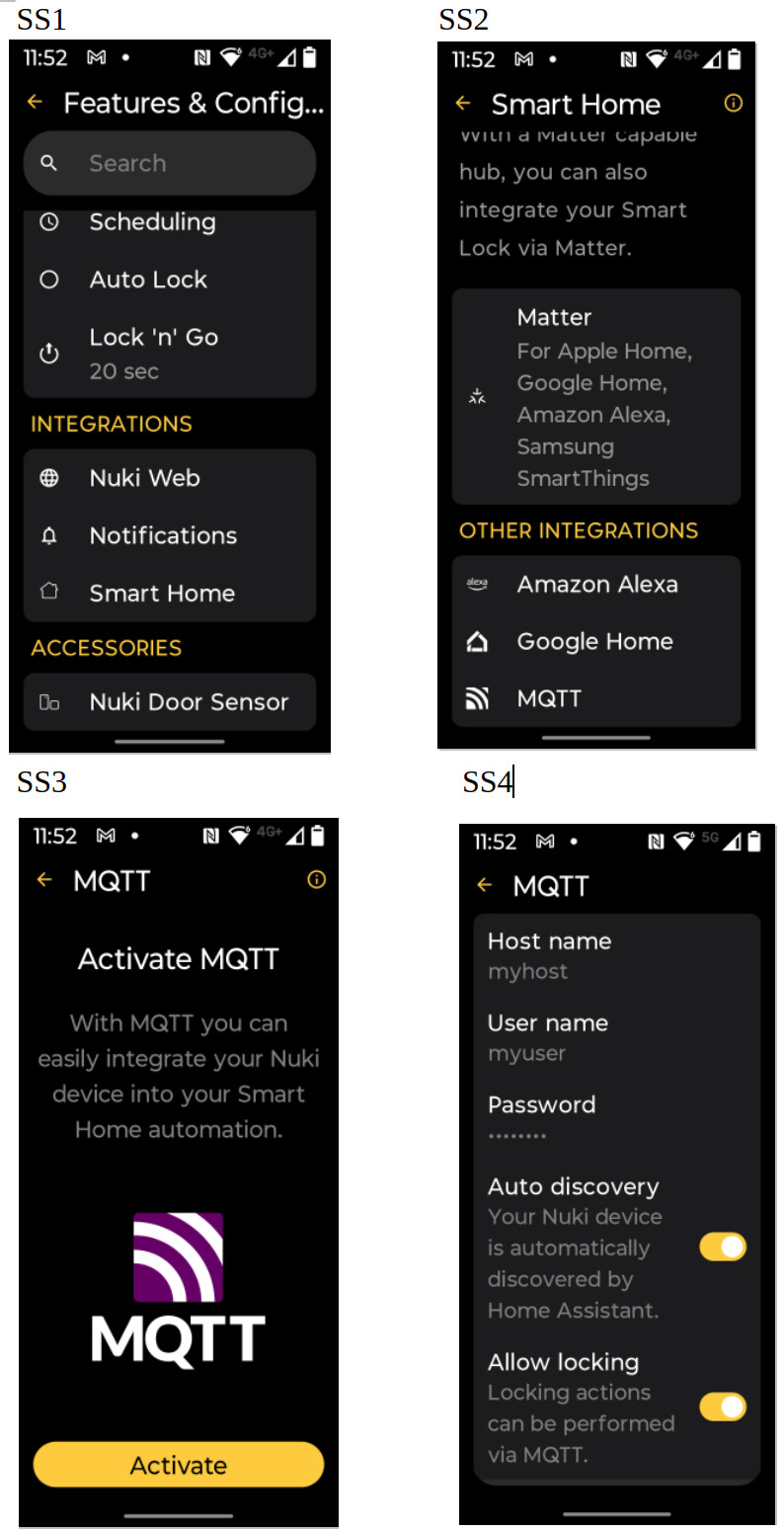
In the phone Nuki app, Opened Settings → Features & Configuration → Smart Home → (OTHER INTEGRATIONS) → MQTT and pressed Activate - It takes me to a screen where I provide the ‘Host name’, ‘Password’, ‘Auto discovery’, ‘Allow locking’. There is no save/Ok button but a ‘<-’ at the top to the left of the ‘MQTT’ text. Once providing the IP address and the credentials, I dont see that the lock hits the MQTT server - no connection attempt captured in the logs. And when I press the ‘<-’ all the information I provided are gone the button stays ‘Activate’.
3a. At the same time, I tried hitting the MQTT server from my laptop with the command ‘mosquitto_sub -h -t test -V mqttv311 -u -P ’ and I can see a hit in the MQRTT server log. So no MQTT server issue.
Looks like the lock is not even attempting to connect to the MQTT server.
I tried closing and opening the app, locking and unlocking (and again closing and opening the app) with no success.
Hope I have covered things in detail. Please let me know if you need more information I may have missed above.
There is an “Activate” button at the bottom of the screen which turns yellow once the hostname and username have been entered. Without clicking it, the lock will not attempt to connect.
‘There is an “Activate” button at the bottom of the screen’ - thats why created this ticket in the first place. I dont see any button appearing (anywhere) upon entering all the details. I tried scrolling and could not see anything.
Navigate to ‘Settings->Features & Configuration->SmartHome’ (as in SS1)
In the ‘Smart Home’ screen clicked ‘MQTT’ (SS2)
Which brings up the screen SS3
In there clicked the ‘Activate’ button’
Which brings up the screen SS4.
At SS4 after providing valid values (I have provided dummy values to take the screenshot; in my actual attempt, I put in the valid values) to the fields, I dont know what to do to make the connection as I dont see any button (Save/Activate) at the bottom; I tried scrolling up and down in SS4 and I dont see any button/link to proceed. I I click ‘<-’ at the top next to the ‘MQTT’ it takes me back to SS3 and if I click ‘Activate’ again it takes me to SS4.
It seems as if the large font size is causing problems on the MQTT screen and it cannot be scrolled and thus the final “Activate” button cannot be reached.
We’ll check this out and provide a better handling with an upcoming update - for the time being a workaround to finish up the MQTT activation would be to decrease the font size in order to have access to the “Activate” button on the last step (SS4).