On the setup checklist, in “Activate Built-in WiFi” screen, there are two buttons overlapping:
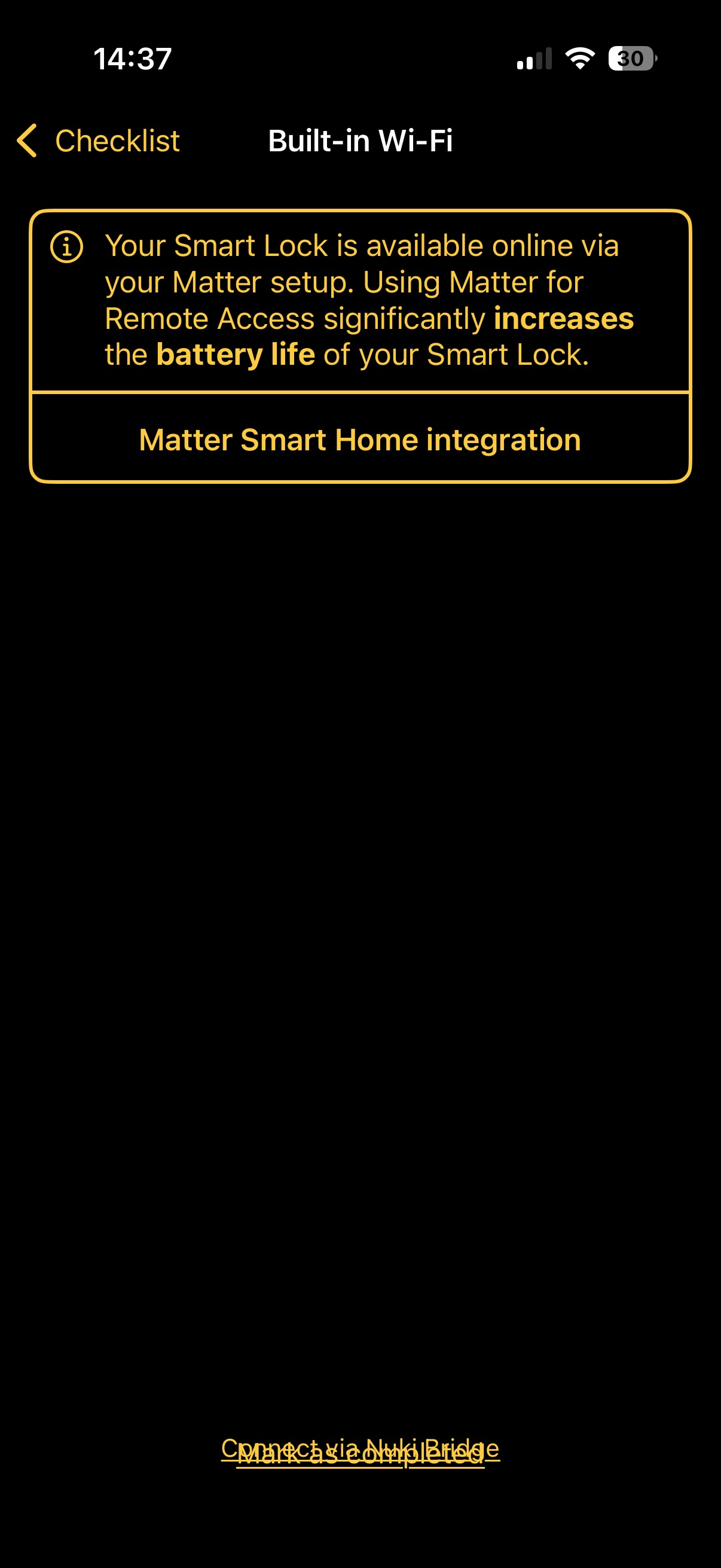
Mark completed is below “Connect to Nuki bridge” and thus can’t be tapped.
On the setup checklist, in “Activate Built-in WiFi” screen, there are two buttons overlapping:
Mark completed is below “Connect to Nuki bridge” and thus can’t be tapped.
could you provide more info on your issue:
Latest iOS app: 2025.12.2 (2704)
Setup was for Smart Lock Pro 4th gen.
Not sure what “steps were done” you mean; I went through the checklist one by one and on this particular checklist item it shows the content as displayed.
Can’t recall the exact order of steps; it might be that I went to add it to WiFi then changed my mind and went with Matter integration.
Although I don’t see how that helps — these buttons should be added to some form of vertical StackView and would thus not overlap so I can tap “Mark as completed”