I recently switched from a Yale Linus L2 to a Nuki Ultra because I was having a lot of issues with Yale’s Matter support.
I’ve noticed something odd with the Nuki Ultra. When I manually unlock the door using the thumb turn, the lock continues to show Locked state. I have to rotate the thumb turn another 2–3 cm before the status changes to Unlocked.
Ideally, I’d like the lock to report Unlocked as soon as the door is manually unlocked, without having to turn 2-3cm more.
I’ve already tried:
- Running the Calibrate Smart Lock process several times (no noticeable improvement).
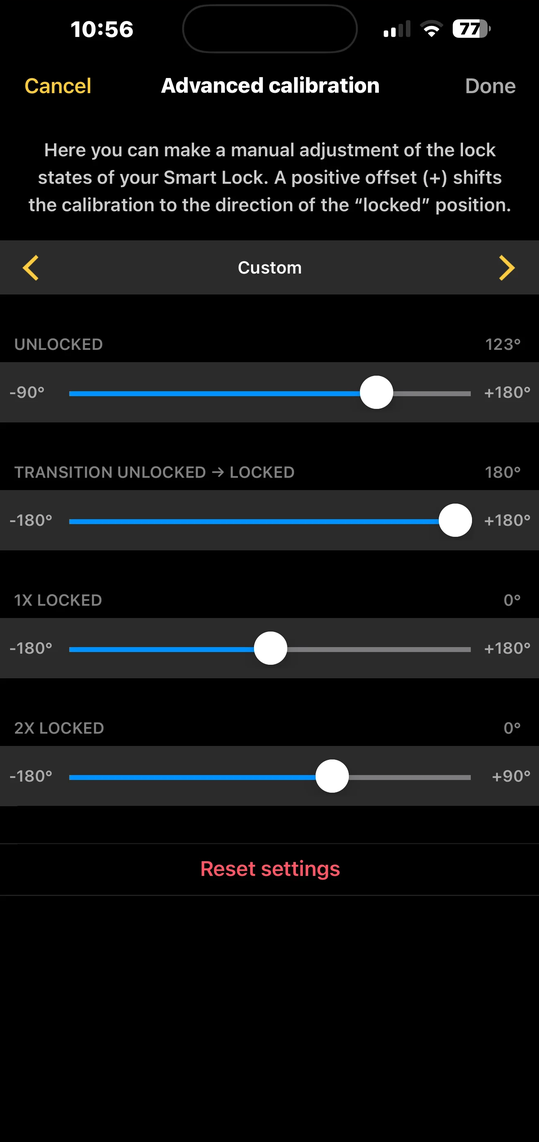
- Going into Optimize Locking → Custom and manually adjusting the calibration. This made it slightly better, but it’s still far from accurate.
I’ve experimented with a lot of different settings, but none seem to solve the issue. With the settings shown in the screenshot below, there’s still about a 2–3 cm “dead zone” where the lock reports Locked even though it’s already been manually unlocked.
Note that i have only this problem when manually unlocking and not using the app to unlock.
Has anyone experienced the same thing or found a way to fix it?
Any suggestions would be greatly appreciated!