As far as I can tell, MQTT runs over Wi-Fi, and the lock reacts almost instantly. I’m loving it.
The only criticism I have (and it has nothing to do with MQTT and is about the Nuki app) is that when navigating between different settings in the Nuki app, it sometimes takes several seconds before you can access them.
1 Like
Your message is confusing and apparently contradictory. First, it states that “Without NAT64 the Thread connection provided by Matter won’t allow the Nuki Apps to remotely control the Smart Lock”. But in the end you state “So also without NAT64 you’re able to connect your Smart Lock to Matter and remotely control it via Matter.”
Or are you saying that Nuki can use Matter over WiFi, and not only over Thread?
1 Like
No.
What he is saying is that the Matter pairing flow provides the Thread credentials for the Smart Lock to connect to a Thread network. If this network provides NAT64, the Smart Lock can use it to connect to Nuki servers and thus provide connectivity for the Apps.
On top of this the Smart Lock uses the same Thread connectivity to provide Matter services and commands such as to lock/unlock the Smart Lock or subscribe to its current state.
1 Like
To come back to the initial problem: so, there is currently no way to use Nuki with Alexa via Thread, because Alexa doesn’t support NAT64.
I have two options:
- Use another Thread border Router like home assistant
- Use Alexa to control via WiFi, although more energy-consuming and slower.
Correct?
1 Like
No.
You can use the Matter integration to control the Nuki through the Alexa App.
You can not use the Matter integration (i.e. it’s Thread connectivity) to control the Nuki through the Nuki App (from remote. The Nuki App could still connect via WIFI if it is enabled or BLE if you are within BLE reach of the lock).
1 Like
It all sounds like a house-of-cards… Nuki should work out a solution that „does it all“ and “always works” rather than “hide” behind complicated “technologiy-speak” no average customers wants to be confronted with, as it gives the feeling that Nuki and Matter are a very unlucky marriage. End this super-frustrating situation fast!
This is not working for me. I can’t connect my Nuki with Alexa via Matter. Maybe my device is broken.
1 Like
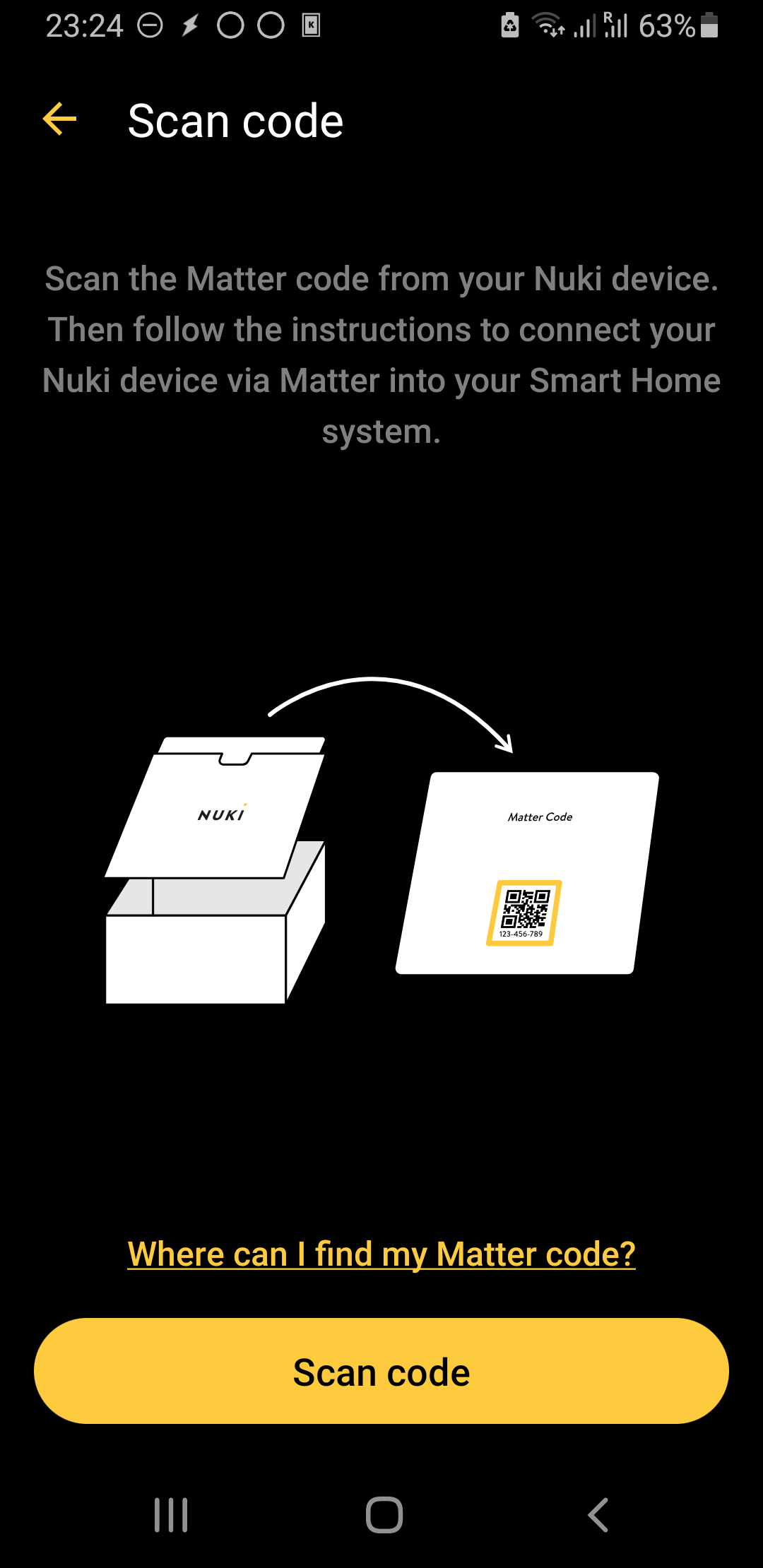
I attempted to integrate Alexa with Nuki via Matter using the Nuki Android app, but the process failed. The app prompted me to “scan code” (see attached screenshot), which wasn’t possible since I no longer have the QR code card, only the numerical Matter code.
Next, I tried the same setup using the Nuki iOS app. This time, the app didn’t ask to scan a code; it simply prompted me to open the smart home app. I opened Alexa, entered the numerical Matter code, and it worked perfectly.
It seems there may be a bug in the Nuki Android app related to Matter setup.
1 Like
The Nuki + Alexa + Matter integration can be a bit confusing for users. It certainly was for me at first. Here’s what I’ve learned from my own experience.
- When the Nuki lock is connected via both Wi-Fi and Matter
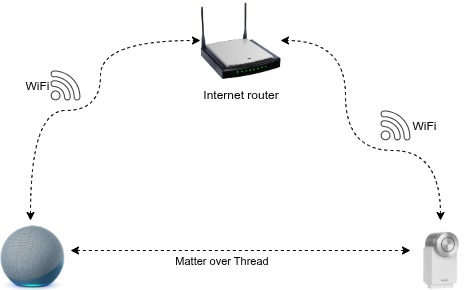
With this setup, you can control the lock using any of three protocols:
- Through the Nuki mobile app (IP or Bluetooth) or Nuki Web (IP)
- Through Alexa, including when you’re outside via the Alexa mobile app (Thread)
Pros:
- You can control the lock using any of three protocols: Thread, IP, or Bluetooth
- Very fast response time (when commands are sent via Alexa)
Cons:
- Potentially shorter battery life
.
- When Wi-Fi is disabled on the lock
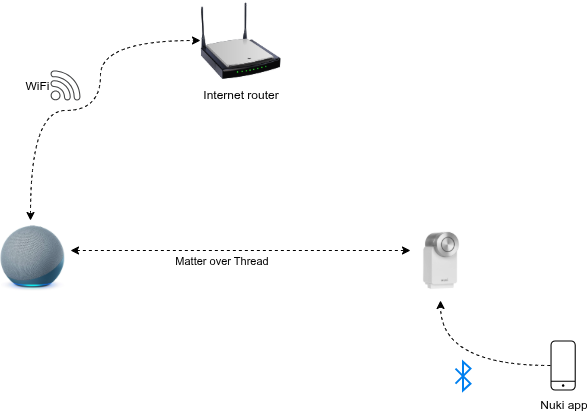
With this setup, you can control the lock in the following ways:
- Using Alexa, voice or mobile app (Thread)
- Using the Nuki mobile app (Bluetooth)
Pros:
- Very fast response time (when commands are sent via Alexa)
- Longer battery life
Cons:
- You can’t control the lock remotely via Nuki Web or the Nuki app (when not in Bluetooth range)
.
@Juergen, can you please review the above and let me know if there’s anything wrong or missing?
1 Like
There are 2 more possibilities:
- If the Thread border router provides internet access (via NAT64) the Smart Lock will turn off it’s WIFI radio and use Thread instead for remote access to the Nuki App. i.e. power consumption will be the same as in (2). This can be turned off in the Matter settings of the Smart Lock in the Nuki App settings.
- If your SL is already connected to a Matter hub (called “fabric” in Matter language) when you connect it to an Amazon device as 2nd fabric it will use the connectivity provided by the first fabric and the Amazon hub could even be one that does not have a Thread radio
- There is also still the Amazon cloud skill available. If you activate it, it will go through Nuki Web and use the same connectivity path as the Nuki App does for remote access.
2 Likes
This topic was automatically closed 180 days after the last reply. New replies are no longer allowed.